Text Updates
How drivers sign up for ShopFeeder Repair Notifications · Effective October 27, 2026
ShopFeeder is run by FixNet Solutions LLC. Drivers who send a repair request on ShopFeeder can choose to get text updates about their own repair ticket. Texts are optional - they're not required to use ShopFeeder or to make any purchase. Drivers always enter their own mobile number and opt in themselves; ShopFeeder staff and repair shops never sign anyone up. We never send marketing or promotional texts.
Route Desk and Job Link are products within the ShopFeeder platform, developed and maintained by FixNet Solutions LLC. Route Desk is where drivers send repair requests and choose a shop. Job Link is where repair shops manage their jobs, quotes and messages with drivers. All text messages are sent under the ShopFeeder name.
1. On the repair request form
After picking a shop, the driver enters their name, email and mobile number. The text updates box is optional and unticked until the driver ticks it, then they press Create My Ticket.
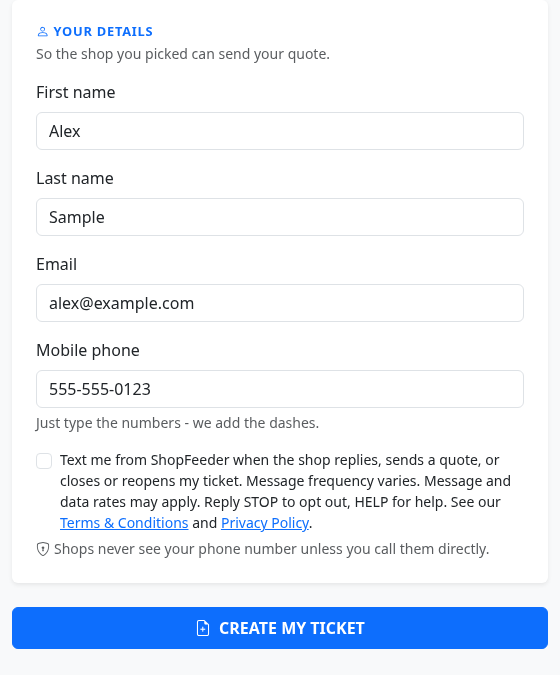
The checkbox wording, exactly as shown:
Text me from ShopFeeder when the shop replies, sends a quote, or closes or reopens my ticket. Message frequency varies. Message and data rates may apply. Reply STOP to opt out, HELP for help. See our Terms & Conditions and Privacy Policy.
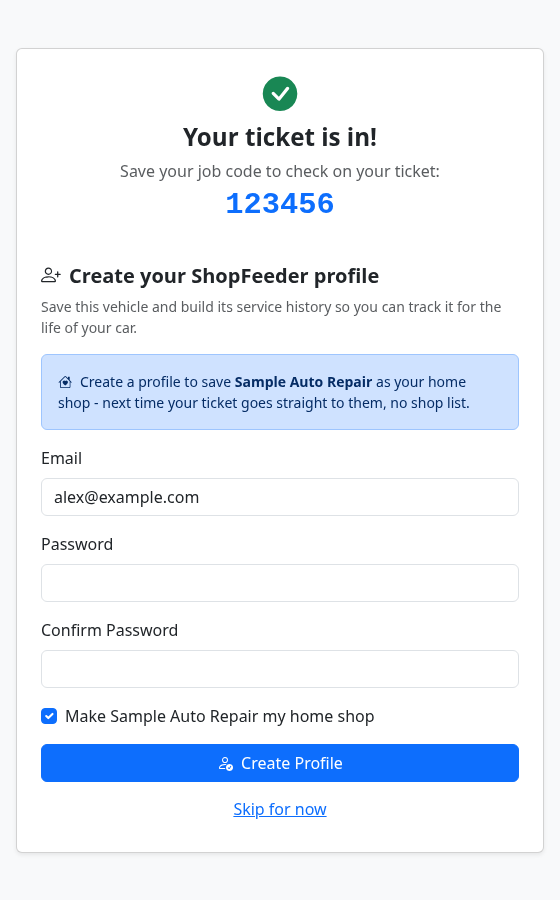
After submitting, the driver sees their job code:
2. In the driver's profile
Drivers with a ShopFeeder profile can turn the same text updates on or off at any time with a switch on their dashboard. It shows the same disclosures and links.

3. Confirmation text
When a driver opts in either way, they get one confirmation text:
ShopFeeder Repair Notifications: You're subscribed to texts about your repair tickets. Msg frequency varies. Msg & data rates may apply. Reply HELP for help, STOP to cancel.
4. What we send
One-way notifications about the driver's own repair ticket, each with a link to view it on shopfeeder.net:
- The shop sent a quote
- The shop replied to the driver
- The shop closed the ticket
- The shop reopened the ticket
Example:
ShopFeeder: [Shop Name] sent you a quote for job #[1234]. Review it: [link] Reply STOP to opt out.
Message frequency varies with the repair: at most one text per job for each kind of update within 15 minutes.
5. Help and opting out
- STOP - reply STOP to any text. We confirm once and send no more texts. Drivers can also turn the switch off in their profile. Reply START to join again.
- HELP - reply HELP, or email help@shopfeeder.net.
- Message and data rates may apply. Carriers are not liable for delayed or undelivered messages.
- No mobile information is shared with third parties or affiliates for marketing or promotional purposes.
Full details: Terms & Conditions (text message terms) and Privacy Policy (text messages).